Testing your app’s response to sensitive media
Trigger your app’s intervention flow by using a special QR code and profile that Apple provides for testing.
Overview
You can test your app’s response to sensitive content in media by analyzing a special QR code. When Sensitive Content Analysis encounters media that contains the code, the framework flags the media as sensitive. Testing with the QR code enables you to experience your app’s intervention workflow without storing or displaying content that contains sensitive material. You can use this testing process in an open development environment, or while demonstrating the app to an audience. To enable the framework to recognize the test QR code as sensitive, download and install a special profile on the development device.
Download the QR code
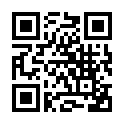
Although the following image contains no sensitive content, the framework recognizes it as sensitive. By returning isSensitive = true, the analyzer (SCSensitivityAnalyzer) returns a false positive for this QR code for the special purpose of testing.
[Image]
Click or tap to download the test image. Use the test video to generate a false positive with video.
Install the test profile
The framework considers the test QR code sensitive only if the development device contains a special profile. Apple provides a special profile specifically for this purpose:
Download and install the Sensitive Content Analysis profile.
Reboot the device for the test profile to take effect.
Embed the test QR code in another image or video
You can include the QR code in other images or videos, and Sensitive Content Analysis recognizes the host media as sensitive. For example, you might incorporate the QR code in a larger media file that:
Indicates the test content with a visual alert such as a yellow triangle
Brings attention to the test content with an alert in text, such as, “A sensitive image.”
If the QR code varies in size or position within the host media, the framework can still recognize it if its details remain crisp and unobstructed. In a video file, position the QR code in the first frame.
Test the media and generate a false positive
In your app, check the test media by calling one of the analyze functions. For example, call analyzeImage(_:completionHandler:) and pass in the image as an argument. Or, call analyzeVideoFile:completionHandler: and pass in the test video as an argument. If you have installed the test profile and made it active on your device, the functions return an SCSensitivityAnalysis instance with isSensitive set to true and detectedTypes containing sexuallyExplicit.